Translate

Showing posts with label Roomba. Show all posts

Sunday, February 28, 2021

Repair Roomba 5th gen brush block

UPDATED !

Roomba is a very good brand of home robotics, I own one Roomba 6 and one old Roomba 5th generation (560).


In these years of use of course I had to repair it sometime.
The battery of course usually last about 1 to 2 years, I had a wheel unit broken, had to clean the sensors, a couple of lateral brush motor broken and now, a main brush defective.

Thursday, May 4, 2017

Roomba 5xx - repairing a power supply

Time ago I had a Roomba 560 with an Error 5.
The problem was the power supply used to charge the battery.


Time to try to fix it.

Sunday, November 11, 2012

External iRobot battery charger modifications - manual


In order to test the Roomba 4xx series battery, it is needed a battery tester.
The ultimate goal is to design an automatic gadget, but first some experiments are needed.
More articles will follow.

The test battery project, uses different components.
The most important is the battery charger.
Instead to design one from the scratch, I decided to use the external iRobot charger model 02004, out of production for some time now but still available on eBay and modify it.


Battery charger 


As usual, before any modifications ...

CAUTION !
The modifications make void any guarantee and are potentially dangerous !

If you are not sure about what you are doing, DON'T DO IT !

There are some advantages to use it.
  • the battery charger circuit is already done
  • it provides mechanical support for the battery 
  • it provides an optimal electrical connection to the battery

However it is not perfect. It was designed mainly for the traditional NiCd batteries, not the NiMh (APS - yellow ones).
It can charge them but it requires TWO charges (see the 02004 technical description by G. Plews )

Anyway, the first thing to do is to modify it in order to be able to connect the battery to the dis-charger and the voltmeter.

Battery charge modifications


The idea is to bring out the battery connectors, in order to connect the battery to the charger or to the dis-charger and the voltmeter.
To open the unit, there are 6 screws on the bottom, 4 of them hidden under the rubber pads. 
Once removed the screws the upper half of the charger separates from the base.
The electronics is anchored to the base.


There are two set of wires going in the upper shell.
Two wires are for the LED, and three wires are for the battery.
The three wires are the negative (black wire), the positive (red wire) and the thermistor feedback (blue wire).

To "bring out" the battery connections, I used a 4 pins audio connector (Radio Shack mod. 274-0002).
The choice of the connector was mostly due to what I was able to find to the local Radio Shack, it is enough for testing manually the batteries, for an automatic way more signals are needed to be brought  out.
The maximum current involved is less than 5 A, so this connector is perfect for the usage.

Pins usage :
  1. + from battery
  2. - from battery
  3. - from charger
  4. + from charger
The plug used with this connector is the Radio Shack mod. 274-0001.


The idea is to disconnect the 3 wires going to the electronic below, from the PCB with the micro-switches (only  the positive and negative connections) and connect them to the connector.


The charger with the connector.
With this modification I can now connect the battery to the charger, putting together the battery wires with the charger wires, or connect the battery to a dis-charger.


In the picture the battery is connected to the charger manually.

Saturday, October 1, 2011

Roomba repair - common problems


It's quite a while I play with Roomba.
Here a list of the common problems for these little robots (3rd and 4th generation) placed in the most probable happening order.

Battery

THE Roomba common problem is of course the battery.
On average, at least once per year, the battery dies.
It depends about the use of course, and contrary to the common sense, more a Roomba is used, more the battery last.
But as said, on average the battery last about a year.

NiCd batteries are lasting even less, mostly due to the "memory effect".
NiHi batteries are better.

Deck/motor

The second typical  problem that can happens to your Roomba, is in the deck motor or in the deck gearbox.
The deck motor is the electric motor that drives the brushes.
Typically the problems in these areas are happening when the Roomba entangle in wires or thick carpets.
When trying to remove itself,  more trust is placed on the brushes and if this happens often, after a while the mechanic can be damaged.
Actually there are different kind of problems that can happens to that area  :

  1. broken motor gears
    The motor has a gearbox used to increase the torque.
    There are 3 gears inside the motor and they are made in teflon or plastic.
    The typical problem is that one or two of these gears, broken up, losing one or more "teeth".
    The final result is to have the motor spinning and  the main shaft not moving.
    It's enough to replace the gears to fix the problem.  Unfortunately  a new set of gears can cost more than the motor ... so often is more cheap to buy a new motor with a new gearbox (they come as single piece).
  2. broken motor
    More rare but it happens that some internal connections broke.
    In this case the only thing is to replace the motor.
  3. broken electronic
    The motor is driven by some electronic. Specifically a Mosfet is feeding the motor.
    Sometime, even more rare than the broken motor, is the electronics that fails.
    In this case "in theory" is enough to change the mosfet to fix the unit.
    Unfortunately it is extremely difficult because you need to take TOTALLY apart the Roomba in order to extract the electronic.
    Then you change the component and in order to test if the repair is correct, you need to put back totally the unit !
    It's about 2 hours work and if something goes wrong, you need to do it again !
    Unless to have a Roomba simulator , in order to test the electronic without the need to put it in a Roomba, is one of the worse case scenario for repairing a Roomba.
Also the deck gearbox can have problems :
  1. broken gears
    Like the gears in the motor, the gears in the deck gearbox can loose teeth or broke down.
    Having other broken decks is possible to substitute the broken ones.
  2. broken gearbox cage
    A couple of times I had to repair a gearbox deck cage broken.
    The gearbox cage is screwed to the deck and if broken can not keep the gears in the right place.
    Change the gearbox deck cage or the entire deck.

Wheels

The third typical problem with Roomba are the wheels.
The Roomba wheel is quite complex object. It is composed by four parts :
  1. electric motor
  2. planetary gearbox
  3. sensor
  4. tire
Each one of these elements can develop problems, but the most recurring problem is on the sensor.
The sensor is used to determine the speed  of the wheel and is very simple.
A special wheel with some openings is mounted on the main shaft and the light from an infrared LED can reach a photodiode only when an opening in the wheel happens.
The problem is that dust can, and does on time, cover the photodiode, so that become insensitive to the infrared light.
The result is that Roomba loses feedback from the wheel, starting to act crazy.
The phenomenon is well known as circle dance and usually cleaning the sensor solve the problem.
With some luck can be cleaned with compressed air, otherwise the wheel needs to be taken apart.

In all these years I own many Roomba, I never saw a planetary gearbox broken.
It is rare, but is possible to have tires used so much that the rubber is incredibly thin or the electric motor defective.

Tuesday, August 30, 2011

Roomba repair - cleaning techniques


For 3rd and 4th Generation Roomba  

CAUTION !  What described here can damage your Roomba if you don't know what you are doing, and it also make void the warranty !
I'm not liable in case of problems following these suggestions. YOU are responsible about what you are doing.

The most recurring problem for Roomba, is related to the cleaning job is supposed to do.
Dust, hair, strings, ecc., after some time, especially if the unit is not maintained properly, can create problems.
So the first thing to do when repairing a Roomba, is to have it cleaned up.
There are different cleaning techniques, some of them can be applied sequentially to the unit, depending how much dirt is the robot.
I'm describing here the techniques I'm currently using to clean up a third or fourth generation Roomba.

Blowing the unit
The first thing is to blow the unit with compressed air or, like me that I don't have compressed air, with an electric blower.
Better to do that in an open space, not in the house, since usually is coming out a LOT of dust.
I usually open the garage door, then I prepare the Roomba removing the battery, the dust bin and the brushes.
Then I place the Roomba to be cleaned on the floor, "as is" (i.e. I don't take it apart yet) and start to blow everywhere, up and down, trying to direct the airflow in every accessible place.
Also, place the Roomba upside down to clean up the wheels and the bottom of the deck.
Usually clouds of dust and hairball can escape the unit, so better to wear a mask.

Apply the same treatment to the dust bin, removing the filter and direct the air flow also in the vacuum propeller.

Vacuuming the unit
After the initial blowing, the second stage of the cleaning, require to take apart the unit.
Remove the bumper, the top case and the rotating lateral brush.
Doing so many internal parts become exposed, and it is possible to vacuum the unit, in order to remove pieces of dust still attached to the internal parts.
It is typical to have airballs mixed with dust on the deck and dust stuck in little spaces, not accessible from the outside.

With "not so dirty" Roomba, the blowing and the vacuum are enough to have the unit clean.
In these cases is enough a wet cloth or some cleaning cloth products, to remove the dust and have back the unit like new.

Same treatment to the dust bin. Just be sure to remove the filter first.

Unfortunately many Roomba never received a decent maintenance during their life.
For these units is mandatory to proceed to the third cleaning phase.

Washing the unit
For very dirty units, it is necessary to wash them.
Depending what you have available, there are different techniques.
Having an old dishwasher available, it is possible to put Roomba in it and perform a short cycle.
I have an utility sink in garage, so what I usually do is to fill up a basin, big enough to contain the Roomba, with warm soapy water.
I use a car wash soap, in order to remove also some external greasy dirt, and a mild brush, to gently stroke in every accessible unit part.

For very dirty Roomba is maybe better to detach the deck from the unit and having it washed separately.
Put the Roomba in the warm water, agitate the water (so to allow a deep penetration) and use the brush (gently !!!) on electronics and mechanical parts.
Then rinse accurately the unit with fresh water.

The trick is then to dry the unit as fast as possible.
After moving the Roomba up and down for a while, in order to remove as much water as possibile, I normally use the blower as first drying step, so to force the water out from inside.
Then I place the unit under the sun (here in Arkansas is quite powerful) for few hours.
An alternative could be to use a dryer, of course assuming the dryer has a stable internal platform (many dryers have that option).
Is not a good idea to place the Roomba in the drum !!!

The same technique can be applied to the dust bin, unless is a dust bin with the Empty indicator.
This kind of dust bin is called Intellibin.
These dust bins have an extra electronic powered by an independent battery.
So DON'T WASH the dust bin unless you remove first the battery.
Unfortunately to remove the battery, you have to totally take apart the dust bin !


Video


Here a video that shows how to perform a "vacuum type" of cleaning, i.e. opening the Roomba and cleaning the inside.
The video has the soundtrack in Italian but I think it can be helpful anyway.
The time necessary to do a decent job, assuming to have a little bit of experience in opening and closing the Roomba, is around 30 minutes more or less.


Sunday, August 28, 2011

Interface Roomba-USB

In order to diagnose/repair a Roomba, it is necessary to do some test and measurements.
Even if each Roomba has a diagnostic program on-board, often is necessary to have more control and a better feedback, with also some measurements.
To do so the basic tool every Roomba-hacker needs to have is a cable to connect the Roomba with a PC.

There are many ways to buy/build such cable.
This article describe how I did it, just to give ideas. Is not necessarily the best way but it worked for me.

Material


We started from a consumer SIM USB card reader.  These readers are available on ebay and similar places for few dollars.
Here a picture of the electronic board (they usually come in some kind of plastic box).


These USB SIM card readers usually are based on a chip capable to convert the USB port into a serial one, the Prolific PL-2303.
Then a cable with a minidin connector is needed and eventually a PCB minidin.
In my specific case I used :
  • USB SIM card reader
  • 8 pin minidin PCB outlet
  • 8 pin minidin cable (at both ends)

Preparation


The first thing to do is to remove from the USB SIM card some useless components, like the SIM card connector, a 74HC04 and a Crystal (3.5 Mhz).


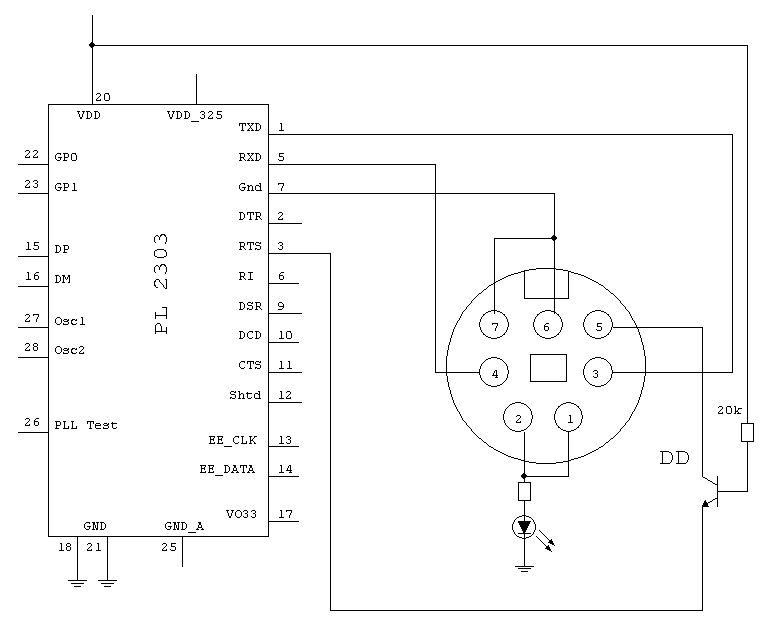
At this point is necessary to identify on the PL-2303 the pins we need to connect.
  • Pin 1 PL-2303
    TXD -> connected to the Roomba RXD (pin 3 minidin)
  • Pin 3 PL-2303
    RTS -> connected via a transistor to the Roomba Power pin (pin 6 minidin 7 - pin 5 minidin 8)
  • Pin 5 PL-2303
    RXD -> connected to the Roomba TXD (pin 5 minidin 8 - pin 4 minidin 8)
  • Pin 7 PL-2303
    GND - pin 6/7 minidin 7 - pin 7/8 minidin 8)

Here the schematic of what we want to do :


It is very important to pay attention of the type of minidin used.In the schematic I used the original Roomba minidin 7, so the pinout is DIFFERENT from the minidin 8 !
On the net is possible to find information about the pinout and specifications, like here.
Here some pictures of cable preparation.